
Walgreens
Walgreens CoShopping
4.6230.71K Reviews
- Version
- 117.1
- Installs
- 10.00M
- Age Rating
- Everyone
Screenshots
Our Review of Walgreens
 Analysis by Appyee
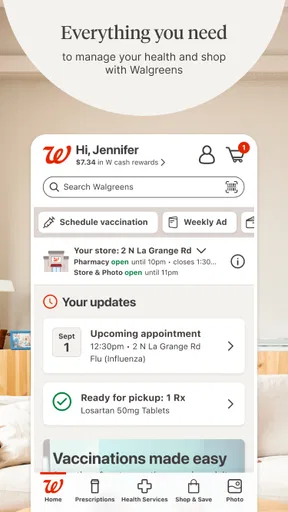
I tested Walgreens as a shopping app with a practical question in mind: does it make ordinary pharmacy errands easier without making me feel lost in a maze of offers, prescriptions, and account screens? My answer is mostly yes, provided you are already comfortable using Walgreens for your pharmacy or household purchases. It brings several tasks into one place, including prescription management, shopping, coupons, and photo services, so it can save time when those needs overlap.
What I like most is that the app feels built around real errands rather than browsing for entertainment. You can open it when you need to check a medication, look for a discount, arrange a photo order, or buy something from the store. That combination gives it a clear purpose. At the same time, the breadth of the app means it is not always as simple as a dedicated shopping app or a specialized prescription tool. You may need to pay attention to which part of the Walgreens experience you are using and what information you are sharing at that moment.
How Walgreens earns trust during everyday pharmacy tasks
Walgreens is developed by Walgreens Co and has been available since June 3, 2010. It is a free shopping app for Everyone, with a current version of 115.2 and support beginning with OS 10. Its scale is also easy to notice: it has more than 10 million installs, an average rating of 4.6, and roughly 1.5 million ratings, alongside around 229 thousand written reviews. Those figures do not prove that every experience is smooth, but they do show that this is an established app used by a large audience rather than a small experiment.
Trust matters more here than it would in a basic grocery catalog because the app can be involved in prescription-related activity. I would not judge it only by how quickly it displays products or coupons. I pay more attention to whether the app makes the difference between a routine purchase and a sensitive health task understandable. In my experience, that is the right way to approach any pharmacy app: convenience is useful, but clarity should come first.
The app’s main advantage is that it gathers several Walgreens services under one account experience. Instead of switching between a pharmacy process, a coupon page, a photo service, and a separate store catalog, I can start from the same app. That is especially helpful for people who already visit Walgreens and want one place for recurring errands. It is less compelling if I only want general product shopping and do not use the pharmacy or photo functions.
What the combined design does well
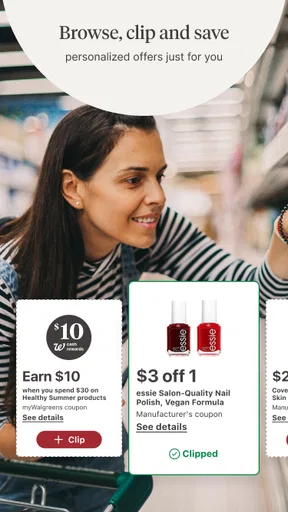
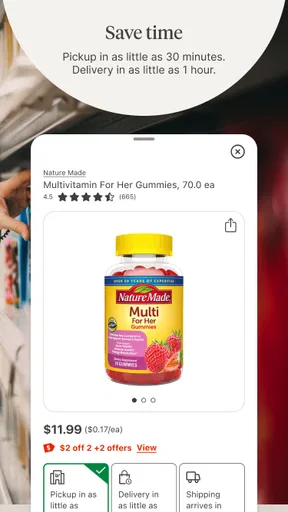
The shopping side is useful for planning a quick store visit. I can look for a product before leaving home instead of walking through the aisles hoping it is available. Coupons add another reason to check the app before buying. My practical advice is to review the offer details before heading to the checkout, because a discount is only helpful when its conditions match the item, quantity, and timing of the purchase.
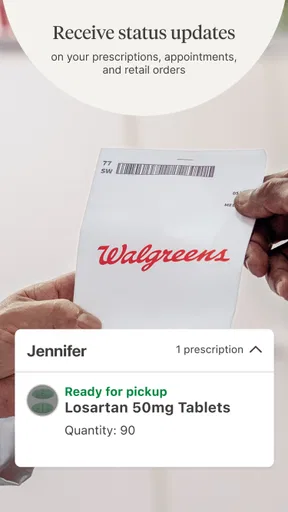
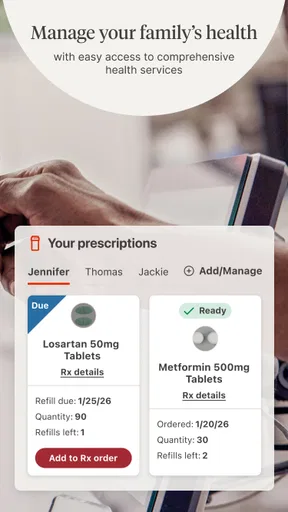
The prescription area is the part that can save the most effort. A person managing recurring medication may prefer checking the app rather than making a separate phone call for every routine step. The benefit is not just speed; it is having a record of the task in the same place where other Walgreens errands happen. Still, I would treat the app as a convenience layer, not as a replacement for asking a pharmacist when a medication question is important or urgent.
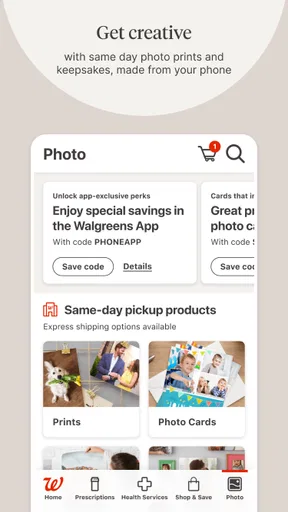
Photo ordering gives the app another distinct use case. Someone who needs prints while already shopping for household or pharmacy items may appreciate not having to find a separate service. This is a good example of Walgreens’ broader approach: the app is strongest when several small errands belong to the same visit. It is not necessarily the best choice if you want a highly specialized photo workflow with advanced editing or creative tools.
Account controls deserve careful attention
Because the app can connect shopping activity with prescription-related tasks, I recommend setting it up deliberately rather than rushing through every prompt. Use an account identifier you can access reliably, choose a password you do not reuse elsewhere, and review each screen before confirming a sensitive action. These are simple habits, but they matter more when an app can contain health-related information.
I also prefer to separate convenience from automatic sharing. If Walgreens asks for access to a device function, I consider whether that access is needed for the task I am performing. Photo features may need a practical way to select images, while a basic shopping search does not necessarily require the same level of device interaction. I do not grant access simply because the app requests it; I decide based on the feature I want to use.
The important point is that visible choices are more valuable than vague reassurance. When I am reviewing an account or starting a pharmacy task, I look for the controls that let me check details, change selections, or stop before submitting. If a screen combines a discount, a product order, and a prescription action, I slow down and verify which action is actually being confirmed. That small pause prevents the app’s convenience from turning into accidental commitment.
Where personal data becomes more sensitive
Not every Walgreens activity carries the same privacy weight. Browsing shampoo or household supplies is different from managing a prescription. Ordering a photo is different again because the content itself may be personal. I find it useful to think in separate lanes: ordinary shopping, pharmacy information, and images. Even when they appear inside one app, they deserve different levels of attention.
A realistic example is a busy weekday evening. I might need to collect a prescription, buy cold medicine, use a coupon, and order a few prints. Opening one app for all four tasks is genuinely convenient. Before confirming anything, though, I would check that the correct store or fulfillment choice is selected, read the coupon conditions, and make sure the photo order contains the intended images. The app reduces switching, but it also puts more decisions on one screen sequence.
Prescription work is where I become most cautious. If I am checking a refill-related detail, I want to confirm the medication and recipient information before proceeding. If something looks wrong, I would stop and contact the pharmacy rather than repeatedly submitting the same request. The app can organize a task, but it cannot replace professional clarification when the issue concerns dosage, interactions, side effects, or a change in treatment.
Photo ordering has its own sensitive moment. Selecting images from a phone can become an automatic habit, especially when the app offers a quick route from the gallery to an order. I recommend reviewing the selected images one more time before submission. This is not a criticism unique to Walgreens; it is a practical safeguard whenever a shopping app handles personal photos.
Coupons and shopping: useful, but not completely frictionless
The coupon function can make the app worthwhile even for someone who rarely uses the pharmacy features. I like checking offers before making a shopping list because it can change which items are worth buying at Walgreens. However, I would not build an entire basket around a coupon until I have read its conditions. Promotional systems often require attention to product variations, quantities, or eligibility, and the app’s convenience does not remove that responsibility.
There is also a behavioral trade-off. Coupons can help me save on something I already planned to buy, but they can also encourage an unnecessary purchase simply because the offer is visible. My rule is straightforward: make the list first, then use Walgreens to look for savings. That keeps the shopping feature working for me instead of letting the promotion decide what I need.
Compared with a general marketplace app, Walgreens is more focused on the connection between a physical pharmacy, health-related services, and store promotions. A broad marketplace may offer a wider range of sellers and products, while Walgreens is more useful when I want the Walgreens ecosystem specifically. Compared with a standalone pharmacy app, Walgreens has a wider shopping and photo scope. The trade-off is that its interface may feel busier than a tool designed only for medication management.
Who should use it and who may prefer another option
I would recommend Walgreens to regular Walgreens customers who want to combine prescription tasks with store shopping. It is also a sensible choice for people who frequently use coupons, need occasional photo orders, or prefer preparing for a store visit from a phone. Families and caregivers may find the centralized approach useful, but they should be especially careful about account details and recipient information before confirming a pharmacy action.
I would be more cautious about recommending it to someone who wants a minimal app with one purpose. If all you need is a simple product search, the extra pharmacy and photo sections may feel like clutter. If you want detailed medication guidance, a pharmacist or a dedicated medical resource is more appropriate. If your priority is advanced photo editing, a specialist photo app will likely offer a better creative experience before you reach the ordering stage.
People using older devices should also check compatibility before planning around it, since the app requires OS 10 or later. The app is free, which removes a financial barrier to trying it, but free does not mean every service or purchase within the Walgreens experience is without cost. I treat the app as a way to access Walgreens services and products, not as a promise that the underlying items or orders are free.
Practical habits that make the experience safer and smoother
My first tip is to open the app with a specific task in mind. “Check a prescription,” “find a coupon,” “look for an item,” and “prepare a photo order” are clearer starting points than casually exploring every section. This reduces the chance of mixing unrelated actions and makes it easier to notice when the app asks for information that does not seem relevant to the task.
My second tip is to review the final details rather than trusting the first attractive screen. For shopping, check the exact product and offer conditions. For a pharmacy task, check the person and medication details. For photos, check the selected images. These are three different verification steps, and treating them as interchangeable is where avoidable mistakes can happen.
My third tip is to keep account access under control. I would avoid signing in on a shared device unless I can sign out afterward, and I would not leave sensitive screens open while someone else can see the phone. If another person is helping with a purchase or pickup, I would show only what is needed for that task instead of handing over unrestricted access.
My fourth tip is to use the app for preparation, not just last-minute problem solving. Checking a coupon and planning a list before entering the store is more useful than discovering an offer while standing at checkout. Likewise, reviewing prescription information calmly at home gives me more time to notice a mismatch than trying to solve everything in a crowded pharmacy line.
My cautious verdict after using the full range of features
Walgreens succeeds because it connects pharmacy management, shopping, coupons, and photos in one recognizable place. I found the combination genuinely useful for ordinary errands, especially when a single store visit involves more than one kind of task. Its large user base and strong average rating support the impression that many people find the app worthwhile, although individual store processes and personal needs can still shape the experience.
My reservations are mainly about attention and boundaries. A broad app can make life easier, but it can also make sensitive actions feel like ordinary shopping. I would not rush through prescription screens, grant device access without considering the feature, or submit a photo order without checking the selection. Those habits are not obstacles to convenience; they are what make convenience safer to use.
My final recommendation is measured rather than unconditional: install Walgreens if you already rely on Walgreens and want one app for several recurring errands. Start with the feature you actually need, review the available account choices, and keep pharmacy and photo tasks more deliberate than routine product browsing. If you want a single-purpose tool or specialized medical or creative features, another option may suit you better. For a Walgreens customer who values consolidation and is willing to stay attentive, this free app is a practical addition to everyday shopping.
Privacy and Permissions
See what permissions an app requests and how it handles your data.
- Location
- approximate location (network-based), precise location (GPS and network-based)
- Photos/Media/Files
- read the contents of your USB storage, modify or delete the contents of your USB storage
- Storage
- read the contents of your USB storage, modify or delete the contents of your USB storage
- Camera
- take pictures and videos
- Wi-Fi connection information
- view Wi-Fi connections
- Other
- view network connections, pair with Bluetooth devices, change network connectivity, connect and disconnect from Wi-Fi, expand/collapse status bar, control flashlight, full network access, control Near Field Communication, run at startup, reorder running apps, control vibration, prevent device from sleeping, Google Play license check, read Google service configuration
Verdict
Strengths of Walgreens
- Prescription refills and transfers can be managed directly in the app.
- Store pickup and delivery options make shopping more convenient.
- Digital coupons and rewards can help reduce the cost of eligible purchases.
- Photo services let users order prints and other personalized products.
- The app can locate nearby Walgreens stores and display opening hours.
Limitations of Walgreens
- Some features require creating an account and signing in first.
- Prescription information may take time to update after a refill request.
- Deals often include restrictions, exclusions, or minimum purchase requirements.
- App performance and availability can vary by device and location.
- Delivery fees and service limits may apply to certain orders.
Similar Picks in This Category
View All
SHEIN-Shopping Online
Roadget Business PTE. LTD.4.8

Amazon Shopping
Amazon Mobile LLC4.4


Mercado Libre: Compras online
Mercado Libre4.8

Wish: Shop and Save
Wish US Holdings LLC4.7

Alibaba.com - B2B marketplace
Alibaba Mobile4.4
Frequently Asked Questions
What can I do with the Walgreens app?
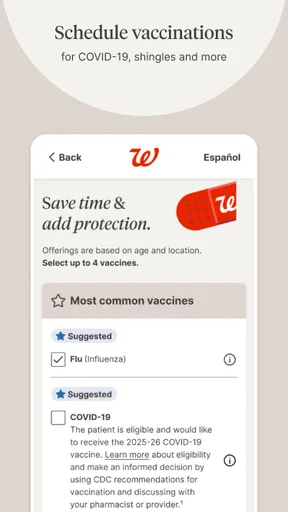
The Walgreens app brings many of the pharmacy’s everyday services to your phone. You can manage prescriptions, request refills, check order status, browse health and beauty products, find nearby stores, view weekly deals, and access photo services in supported locations. Available features may vary depending on your region, account details, store inventory, and whether your prescriptions are eligible for digital management.
Can I refill and manage prescriptions through Walgreens?
Yes, the app lets eligible users request prescription refills, review medication information, check refill status, and choose pickup or delivery options where available. You can usually add prescriptions by scanning the label or entering the required details, while family prescriptions may require additional permissions. Some medications, insurance situations, controlled substances, and pharmacy policies can limit what can be completed entirely in the app.
Does the Walgreens app support prescription delivery and same-day pickup?
Walgreens offers several fulfillment options through the app, including in-store pickup, drive-through pickup at participating locations, shipping, and prescription delivery in selected areas. Availability depends on the medication, pharmacy, local regulations, insurance, delivery coverage, and store capacity. Before confirming an order, review the estimated timing, fees, and pickup instructions because these can differ considerably between locations.
Is the Walgreens app free to download and use?
The Walgreens app is generally free to download from the official Android and iOS app stores, and creating or using a Walgreens account does not normally require a subscription. However, purchases, prescriptions, delivery services, photo orders, vaccinations, and other healthcare services may involve separate costs, copayments, or insurance charges. Always check the final price and applicable fees before completing a transaction.
Is my personal and health information secure in the Walgreens app?
Walgreens uses account authentication and security measures designed to protect personal, payment, and prescription information, but users should still take precautions. Use the official app, create a strong unique password, enable available verification features, and avoid signing in on shared devices. Review privacy settings and sign out when necessary. The app’s privacy practices and data collection details are explained in its official privacy documentation.
